V-Ray Scene Converter
This page gives some details on the settings available within the Scene Converter tool.
Overview
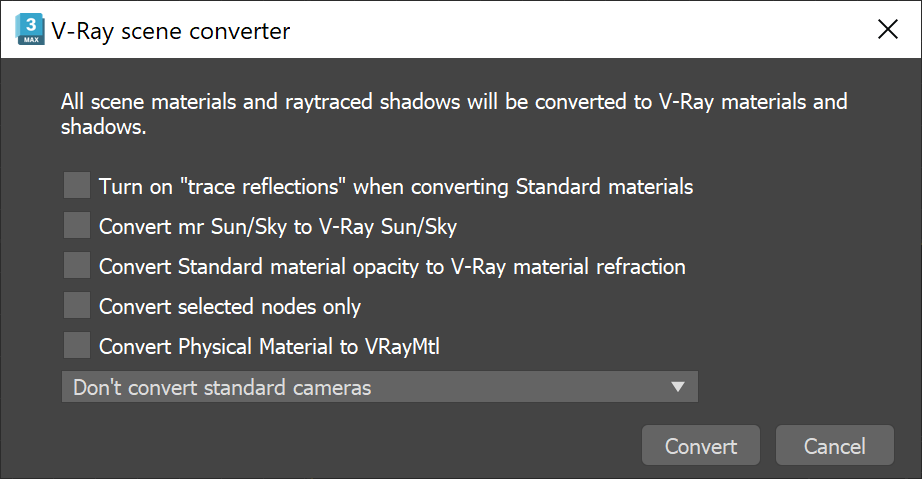
This tool converts all scene materials and raytraced shadows to versions optimized for V-Ray.
UI path: ||V-Ray menu|| > Converters > V-Ray scene converter
In V-Ray 6 for 3ds Max, this tool has been moved to the V-Ray Menu and is no longer available in the quad menu. For earlier V-Ray versions, go to 3ds Max Quad Menu > transform section > V-Ray scene converter.
Parameters
Turn on "trace reflections" when converting Standard materials – When enabled, the trace reflections setting is on for converted Max Standard materials.
Convert mr Sun/Sky to V-Ray Sun/Sky – When enabled, converts Mental Ray Sun and Sky system to a V-Ray Sun and Sky System.
Convert Standard material opacity to V-Ray material refraction – When enabled, converts 3ds Max Standard material opacity settings to refraction settings in a V-Ray Material.
Convert selected nodes only – When enabled, only selected lights, cameras and the materials of selected objects are converted (with applying the other options above for the selection only). If unchecked, the whole scene is converted.
Convert Physical Material to VRayMtl – When enabled, converts Physical Material to V-Ray Material. Note that only V-Ray supported parameters are converted when using this option.
Don't convert standard cameras – (default option) Leaves the cameras in the scene as they are.
Convert standard cameras to V-Ray Physical Camera – When enabled, converts 3ds Max Target and Free cameras to V-Ray Physical Cameras.
Convert standard cameras to Max Physical Camera – When enabled, converts 3ds Max Target and Free cameras to 3ds Max Physical cameras (for 3ds Max version 2016 and newer).
All suitable nodes in the scene will be converted if the Convert selected nodes only option is disabled.
Conversions
The V-Ray Scene Converter is capable of performing the following conversions:
Materials
|
Original |
Result |
Notes |
|
|
Standard Materials |
Standard |
||
|
Raytrace |
|||
|
Architectural |
If there is luminance, wraps the material into a VRayBlendMtl and adds a VRayLightMtl on top of it. If there is translucency, wraps the material into a VRay2SidedMtl. |
||
|
Blend |
|||
|
Shellac |
|||
|
DoubleSided |
|||
|
Corona Materials |
CoronaHairMtl |
||
|
CoronaMtl |
|||
|
CoronaLayeredMtl |
|||
|
CoronaLightMtl |
|||
|
CoronaRaySwitchMtl |
|||
|
CoronaSkinMtl |
|||
|
CoronaPortalMtl |
|||
|
CoronaVolumeMtl |
If there is emission distance, wraps the material into a VRayBlendMtl and adds a VRayLightMtl on top of it. |
||
|
CoronaShadowCatcherMtl |
VRayMtlWrapper with VRayMtl as the base material |
||
|
CoronaPhysicalMtl |
V-Ray scene converter can be used to update obsolete V-Ray material features. Use it to remove the obsolete differentiation between Highlight glossiness and Reflection glossiness.
Textures
|
Original |
Result |
|
|
Standard Textures |
Normal_Bump |
|
|
Corona Textures |
CoronaBitmap |
|
|
CoronaDistance |
||
|
CoronaRaySwitch |
||
|
CoronaRoundEdges |
||
|
CoronaTriplanar |
||
|
CoronaFrontBack |
||
|
CoronaColor |
||
|
CoronaMultiMap |
||
|
CoronaMix |
||
|
CoronaAo |
||
|
CoronaNormal |
||
|
CoronaSky |
||
|
CoronaWire |
Scene Nodes
|
Original |
Result |
Notes |
||
|
Lights |
Photometric |
Uniform Spherical |
||
|
Uniform Diffuse |
||||
|
Photometric Web |
||||
|
environmentMap |
mr_Physical_Sky |
|||
|
helpers:DaylightAssemblyHead |
mr_Sun |
|||
|
Shadows |
All shadow types |
|||
|
Corona |
CoronaLight |
|||
|
CoronaSun |
||||
|
Cameras |
Freecamera |
VRayPhysicalCamera / Physical |
Cameras can be converted to Max Physical cameras with 3ds Max 2016 and later versions. |
|
|
Targetcamera |
VRayPhysicalCamera / Physical |
|||
|
Proxy |
Corona Proxy (CProxy) |
|||