Render Elements

This page is about render elements and their basic usage.


Overview


Render Elements are a way to break out renders into their component parts such as diffuse color, reflections, shadows, mattes, etc. This gives fine control over the final image when using compositing or image editing applications when re-assembling the final image from its component elements. Render elements are also sometimes known as render passes.

Render Elements are generated at render time based on the ones you choose before rendering. Most render elements have parameters that can be set to customize the render element or its later use in compositing software. These parameters are described on each render element's individual page, along with common uses and any notes on their generation and usage.

V-Ray supports the built-in 3ds Max Render elements user interface. However, V-Ray provides its own render elements and does not support the standard render elements implemented in 3ds Max. Therefore standard 3ds Max render elements do not work with V-Ray, and vice-versa.

For a complete list of render elements, see the List of Supported Render Elements below. All render elements support native V-Ray materials. Some render elements also support standard 3ds Max materials.

Since V-Ray Next Update 1, some of the render elements are rendered differently than before. The Lighting render element now contains all direct diffuse illumination and the GI element contains all indirect diffuse illumination. Similarly, all direct reflections of lights now go to the Specular element and all indirect reflections go to the Reflection element.


Error rendering macro 'scroll-html-expand'

Problem executing proxy for macro 'expand'. Check the log.
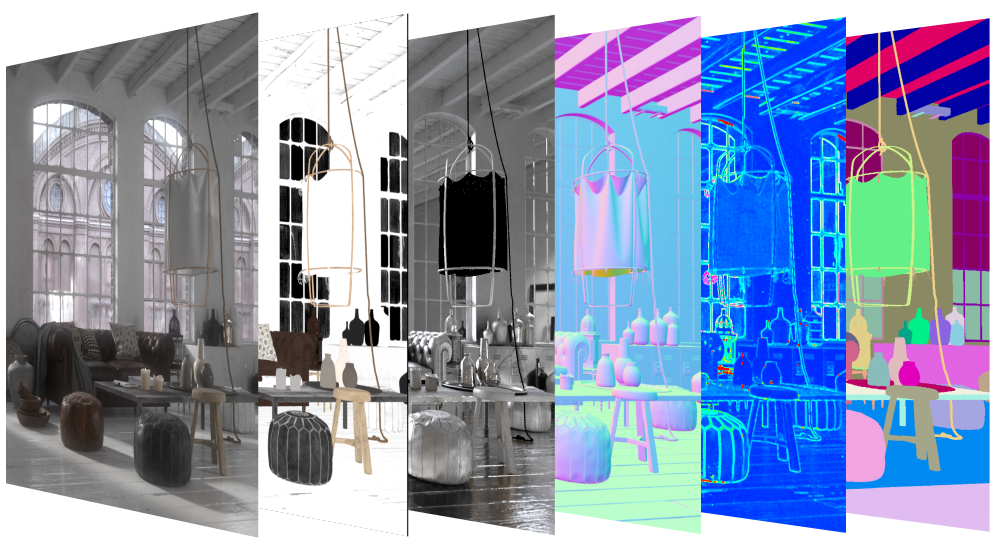


images/download/attachments/60100167/LowRotation_Wide_v03_00000.png

When using the V-Ray frame buffer, V-Ray writes render elements only if you specify either one of the V-Ray raw image file output or the Separate render channels options. If you want to specify the render elements outputs using the 3ds Max Render Output field or using the output options of the various render elements, then you have to disable the V-Ray frame buffer.UI Path: ||Render Setup window|| > Render Elements tab
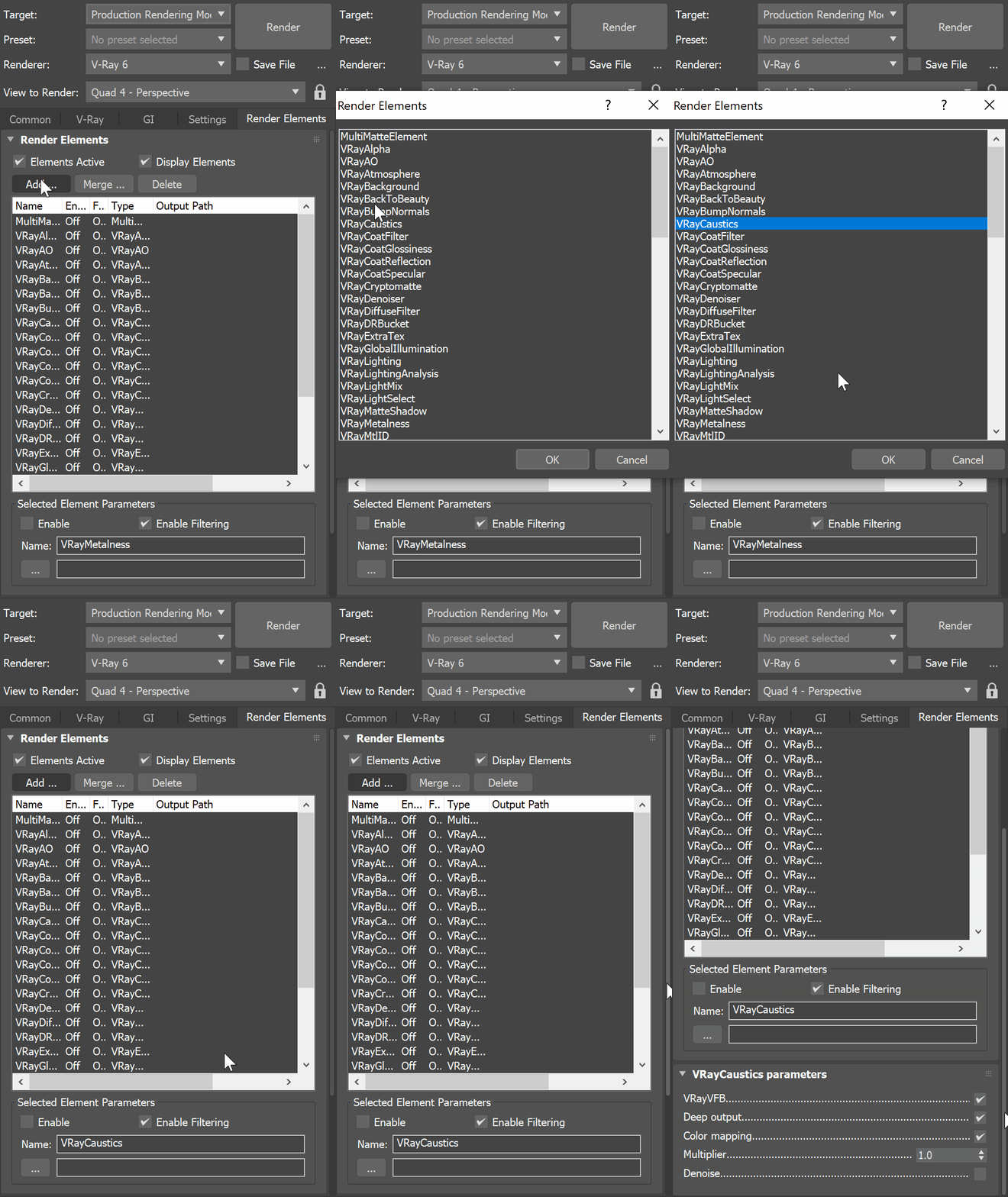

images/download/attachments/60100167/Max2023_VRay6_RenderElements_UIpath.gif

To use render elements, click the Add button to add the render elements you wish to generate at render time. When you render the scene, the added render elements also render. The exception is the RGB color Render Element, which renders automatically without needing to be added.


Render Elements Sub-groups


Render Elements in V-Ray break down into four major groups:


Beauty Render Elements
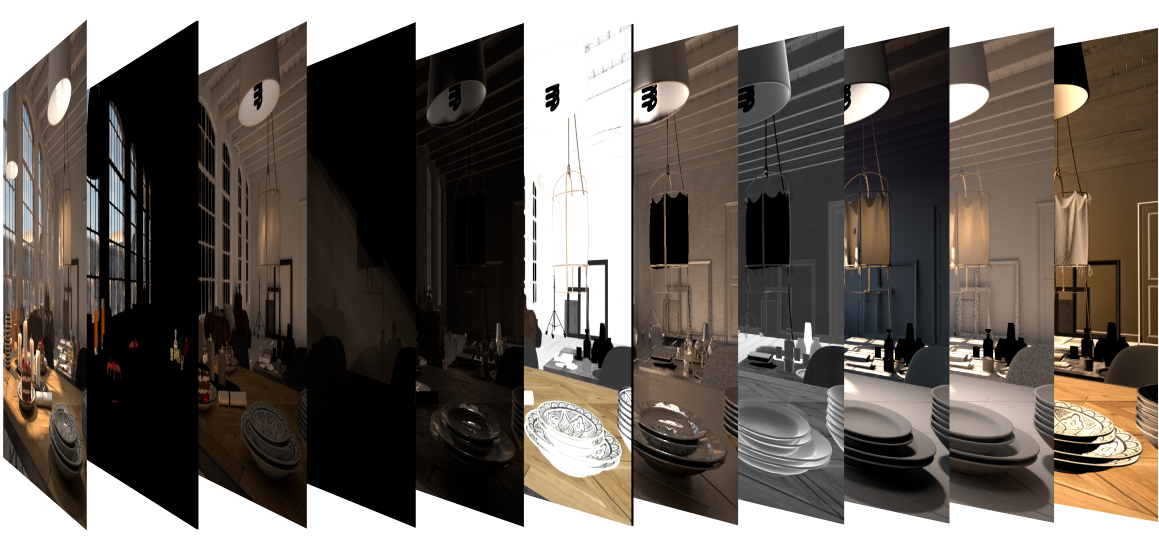
images/download/attachments/60100167/BeautyRenderElements_00000.png
The Beauty Render Elements are the primary render elements that form V-Ray's
pre-composited final render pass
Beauty RGB_Color . These Include the
Lighting , Global Illumination, Reflection , Refraction , Specular, etc.

Matte Render Elements
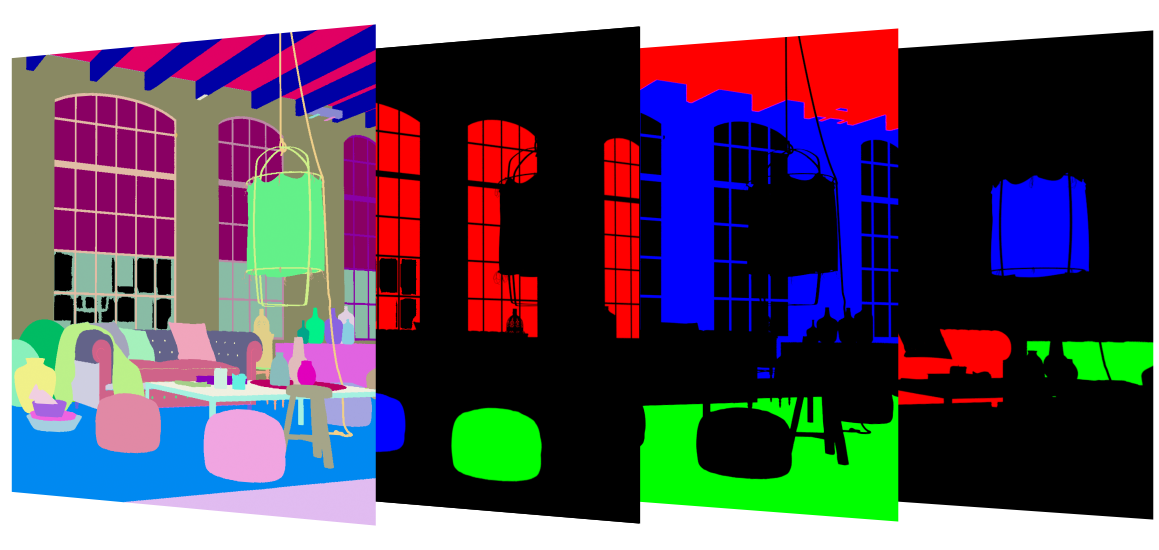
images/download/attachments/60100167/GeometryElementsHero_00000.png The Matte Render Elements aid selection masking in the compositing process.
These include the Material ID, Multimatte, Object ID, and Render ID render elements.


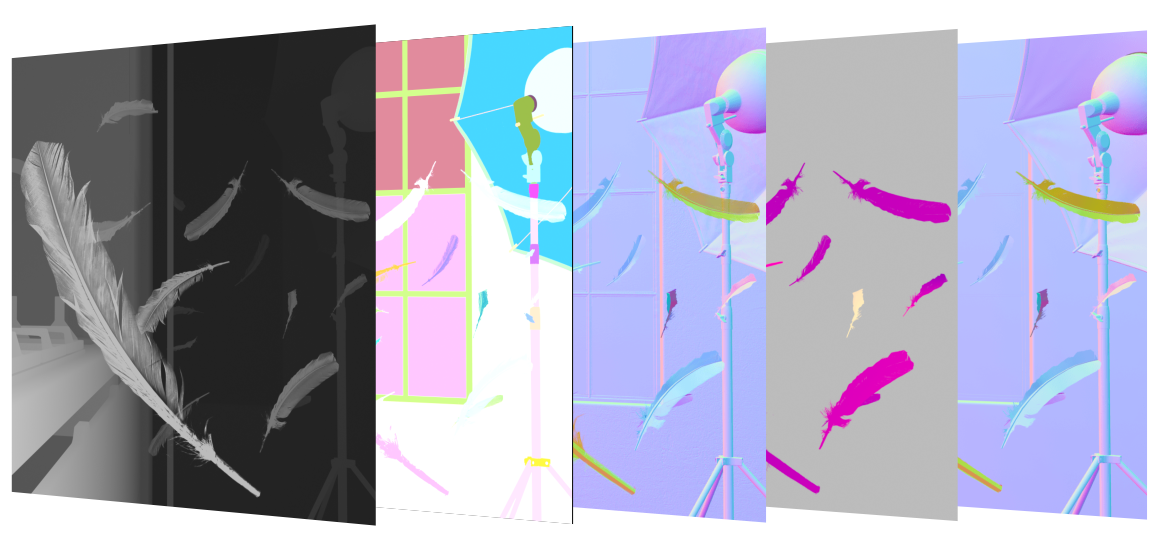
Geometry Render Elements
images/download/attachments/60100167/GeometryElementsHero_2_00000.png

The Geometry Render Elements rely on geometry to generate geometry data for the compositing
process.
These include the Velocity, Z-Depth, Wire Color, and Normals render elements.

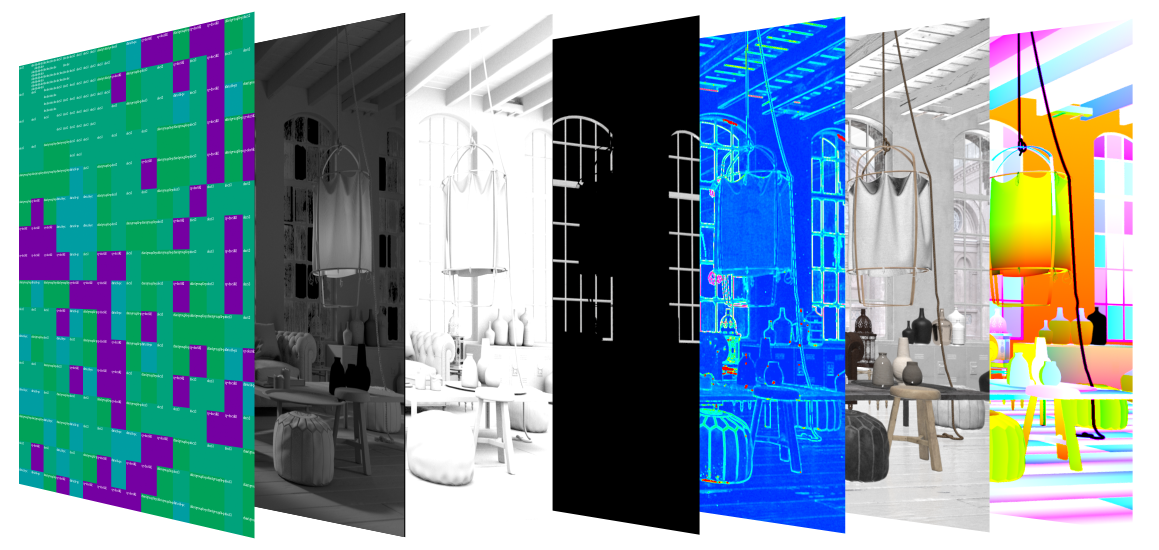
Utility Render Elements
images/download/attachments/60100167/UtilityElementsHero_00000.png
The Utility Render Elements give insight into how V-Ray is running and extra functionality for compositing.
These include the Distributed Render ID, Sample Rate, Denoiser, Extra texture, Sampler Info, etc.


Supported Render Elements


The following render elements are supported by V-Ray. All render elements support native V-Ray materials. Some render elements also support standard 3ds Max materials, and are noted in the table below.

In order to render a correct Raw render pass you need to also render the corresponding main element and filter i.e. for Raw Reflection you need Reflection and Reflection filter, for Raw GI you need GI and Diffuse filter, etc.

Render element name

VRayMtl
support

Standard material
support

Filtering
control

Transparency
support

Color Depth of EXR floating-point channels1

Description

MultiMatte

images/s/desrhh/8804/1v70iay/_/images/icons/emoticons/check.svg

images/s/desrhh/8804/1v70iay/_/images/icons/emoticons/check.svg

images/s/desrhh/8804/1v70iay/_/images/icons/emoticons/error.svg

N/A

16bit/32bit

Creates selection masks based on object G-buffer ID or material ID.

VRayAlpha

images/s/desrhh/8804/1v70iay/_/images/icons/emoticons/check.svg

images/s/desrhh/8804/1v70iay/_/images/icons/emoticons/check.svg

images/s/desrhh/8804/1v70iay/_/images/icons/emoticons/check.svg 2

images/s/desrhh/8804/1v70iay/_/images/icons/emoticons/check.svg

16bit/32bit

Alpha transparency

VRayAO5

images/s/desrhh/8804/1v70iay/_/images/icons/emoticons/check.svg

images/s/desrhh/8804/1v70iay/_/images/icons/emoticons/check.svg

images/s/desrhh/8804/1v70iay/_/images/icons/emoticons/check.svg

images/s/desrhh/8804/1v70iay/_/images/icons/emoticons/check.svg

16bit/32bit

Ambient occlusion effect

VRayAtmosphere

images/s/desrhh/8804/1v70iay/_/images/icons/emoticons/check.svg

images/s/desrhh/8804/1v70iay/_/images/icons/emoticons/check.svg

images/s/desrhh/8804/1v70iay/_/images/icons/emoticons/error.svg 2

images/s/desrhh/8804/1v70iay/_/images/icons/emoticons/check.svg

16bit/32bit

Atmospheric effects

VRayBackground

images/s/desrhh/8804/1v70iay/_/images/icons/emoticons/check.svg

images/s/desrhh/8804/1v70iay/_/images/icons/emoticons/check.svg

images/s/desrhh/8804/1v70iay/_/images/icons/emoticons/check.svg 2

images/s/desrhh/8804/1v70iay/_/images/icons/emoticons/check.svg

16bit/32bit

The image background

VRayBackToBeauty

16bit/32bit

Expands as all beauty elements for the actual rendering.

VRayBumpNormals

images/s/desrhh/8804/1v70iay/_/images/icons/emoticons/check.svg

images/s/desrhh/8804/1v70iay/_/images/icons/emoticons/check.svg

images/s/desrhh/8804/1v70iay/_/images/icons/emoticons/check.svg

images/s/desrhh/8804/1v70iay/_/images/icons/emoticons/error.svg

16bit/32bit

The normals generated by bump maps, in screen space (which is not the same as camera space). Use the VRaySamplerInfo render element to get the normals in camera, world or object space.

VRayCaustics

images/s/desrhh/8804/1v70iay/_/images/icons/emoticons/check.svg

images/s/desrhh/8804/1v70iay/_/images/icons/emoticons/error.svg 4

images/s/desrhh/8804/1v70iay/_/images/icons/emoticons/check.svg 2

images/s/desrhh/8804/1v70iay/_/images/icons/emoticons/check.svg

16bit/32bit

The caustics on the material. Only present when the Caustics option of V-Ray is enabled. This channel does not include GI caustics.

VRayCoatFilter

images/s/desrhh/8804/1v70iay/_/images/icons/emoticons/check.svg

images/s/desrhh/8804/1v70iay/_/images/icons/emoticons/error.svg

images/s/desrhh/8804/1v70iay/_/images/icons/emoticons/check.svg

images/s/desrhh/8804/1v70iay/_/images/icons/emoticons/check.svg

16bit/32bit

Reflection filter for VRayMtl Coat layer.

VRayCoatGlossiness

images/s/desrhh/8804/1v70iay/_/images/icons/emoticons/check.svg

images/s/desrhh/8804/1v70iay/_/images/icons/emoticons/error.svg

images/s/desrhh/8804/1v70iay/_/images/icons/emoticons/check.svg

images/s/desrhh/8804/1v70iay/_/images/icons/emoticons/error.svg

16bit/32bit

Returns a float value that corresponds with the Coat Glossiness value of the VRayMtl Coat layer.

VRayCoatReflection

images/s/desrhh/8804/1v70iay/_/images/icons/emoticons/check.svg

images/s/desrhh/8804/1v70iay/_/images/icons/emoticons/error.svg

images/s/desrhh/8804/1v70iay/_/images/icons/emoticons/check.svg

images/s/desrhh/8804/1v70iay/_/images/icons/emoticons/check.svg

16bit/32bit

Indirect reflections coming from the Coat layers of VRayMtl used in the scene.

VRayCoatSpecular

images/s/desrhh/8804/1v70iay/_/images/icons/emoticons/check.svg

images/s/desrhh/8804/1v70iay/_/images/icons/emoticons/error.svg

images/s/desrhh/8804/1v70iay/_/images/icons/emoticons/check.svg

images/s/desrhh/8804/1v70iay/_/images/icons/emoticons/check.svg

16bit/32bit

Direct surface specular highlights coming from the VRayMtl Coat layer used in the scene.

VRayCryptomatte6

images/s/desrhh/8804/1v70iay/_/images/icons/emoticons/check.svg

images/s/desrhh/8804/1v70iay/_/images/icons/emoticons/check.svg

images/s/desrhh/8804/1v70iay/_/images/icons/emoticons/error.svg

images/s/desrhh/8804/1v70iay/_/images/icons/emoticons/check.svg

forced 32bit ( for multi-channel files)

Uses the Cryptomatte convention by Psypop to encode mattes into multichannel OpenEXRs.

VRayDenoiser 7

images/s/desrhh/8804/1v70iay/_/images/icons/emoticons/check.svg

images/s/desrhh/8804/1v70iay/_/images/icons/emoticons/check.svg

images/s/desrhh/8804/1v70iay/_/images/icons/emoticons/check.svg

images/s/desrhh/8804/1v70iay/_/images/icons/emoticons/check.svg

16bit/32bit

Applies a denoising operation to the image after it is rendered (with the necessary channels).

VRayDiffuseFilter

images/s/desrhh/8804/1v70iay/_/images/icons/emoticons/check.svg

images/s/desrhh/8804/1v70iay/_/images/icons/emoticons/check.svg

images/s/desrhh/8804/1v70iay/_/images/icons/emoticons/check.svg 2

images/s/desrhh/8804/1v70iay/_/images/icons/emoticons/check.svg

16bit/32bit

The pure diffuse surface color. Note that this is different from the standard 3ds Max Diffuse render element, which contains the diffuse surface lighting.

VRayDRBucket

N/A

N/A

N/A

N/A

16bit/32bit

Shows which render node rendered which bucket during distributed rendering

VRayExtraTex

N/A

N/A

images/s/desrhh/8804/1v70iay/_/images/icons/emoticons/error.svg

N/A

forced 32bit (optional for multi-channel files)

Renders the entire scene with one texture mapped on all objects.

VRayGlobalIllumination

images/s/desrhh/8804/1v70iay/_/images/icons/emoticons/check.svg

images/s/desrhh/8804/1v70iay/_/images/icons/emoticons/error.svg 4

images/s/desrhh/8804/1v70iay/_/images/icons/emoticons/check.svg 2

images/s/desrhh/8804/1v70iay/_/images/icons/emoticons/check.svg

16bit/32bit

The diffuse surface global illumination. Only present if Global illumination is enabled.

VRayLighting

images/s/desrhh/8804/1v70iay/_/images/icons/emoticons/check.svg

images/s/desrhh/8804/1v70iay/_/images/icons/emoticons/check.svg

images/s/desrhh/8804/1v70iay/_/images/icons/emoticons/check.svg 2

images/s/desrhh/8804/1v70iay/_/images/icons/emoticons/check.svg

16bit/32bit

The diffuse direct surface lighting.

VRayLightingAnalysis

images/s/desrhh/8804/1v70iay/_/images/icons/emoticons/check.svg

images/s/desrhh/8804/1v70iay/_/images/icons/emoticons/check.svg

images/s/desrhh/8804/1v70iay/_/images/icons/emoticons/check.svg

images/s/desrhh/8804/1v70iay/_/images/icons/emoticons/error.svg

16bit/32bit

Provides visual representation of the lighting intensity within a rendered frame.

VRayLightMix

N/A

N/A

N/A

N/A

16bit/32bit

Adjusts intensity and color of lights and light emitting materials during and after render directly from the VFB.

VRayLightSelect

images/s/desrhh/8804/1v70iay/_/images/icons/emoticons/check.svg

images/s/desrhh/8804/1v70iay/_/images/icons/emoticons/check.svg

images/s/desrhh/8804/1v70iay/_/images/icons/emoticons/check.svg

images/s/desrhh/8804/1v70iay/_/images/icons/emoticons/check.svg

16bit/32bit

Extracts the contribution of a user-defined light or a set of lights in the scene as a separate render element.

VRayMatteShadow

images/s/desrhh/8804/1v70iay/_/images/icons/emoticons/check.svg

images/s/desrhh/8804/1v70iay/_/images/icons/emoticons/check.svg

images/s/desrhh/8804/1v70iay/_/images/icons/emoticons/check.svg

images/s/desrhh/8804/1v70iay/_/images/icons/emoticons/check.svg

16bit/32bit

The matte shadow part of the image.

VRayMetalness

images/s/desrhh/8804/1v70iay/_/images/icons/emoticons/check.svg

images/s/desrhh/8804/1v70iay/_/images/icons/emoticons/error.svg

images/s/desrhh/8804/1v70iay/_/images/icons/emoticons/error.svg

images/s/desrhh/8804/1v70iay/_/images/icons/emoticons/error.svg

16bit/32bit

Creates a black and white image, which can be used as a metalness mask when creating PBR shaders.

VRayMtlID

images/s/desrhh/8804/1v70iay/_/images/icons/emoticons/check.svg

images/s/desrhh/8804/1v70iay/_/images/icons/emoticons/check.svg

images/s/desrhh/8804/1v70iay/_/images/icons/emoticons/error.svg 3

images/s/desrhh/8804/1v70iay/_/images/icons/emoticons/error.svg

images/s/desrhh/8804/1v70iay/_/images/icons/emoticons/error.svg

The material ID of the object.

VRayMtlReflectGlossiness

images/s/desrhh/8804/1v70iay/_/images/icons/emoticons/check.svg

images/s/desrhh/8804/1v70iay/_/images/icons/emoticons/check.svg

images/s/desrhh/8804/1v70iay/_/images/icons/emoticons/check.svg

images/s/desrhh/8804/1v70iay/_/images/icons/emoticons/error.svg

16bit/32bit

Grayscale image from materials' reflection glossiness amount.

VRayMtlReflectHilightGlossiness

images/s/desrhh/8804/1v70iay/_/images/icons/emoticons/check.svg

images/s/desrhh/8804/1v70iay/_/images/icons/emoticons/error.svg

images/s/desrhh/8804/1v70iay/_/images/icons/emoticons/check.svg

images/s/desrhh/8804/1v70iay/_/images/icons/emoticons/error.svg

16bit/32bit

Grayscale image from materials' highlight glossiness amount.

VRayMtlReflectIOR

images/s/desrhh/8804/1v70iay/_/images/icons/emoticons/check.svg

N/A

images/s/desrhh/8804/1v70iay/_/images/icons/emoticons/check.svg

images/s/desrhh/8804/1v70iay/_/images/icons/emoticons/error.svg

16bit/32bit

Grayscale float image from materials' Fresnel reflections IOR amount.

VRayMtlRefractGlossiness

images/s/desrhh/8804/1v70iay/_/images/icons/emoticons/check.svg

images/s/desrhh/8804/1v70iay/_/images/icons/emoticons/error.svg

images/s/desrhh/8804/1v70iay/_/images/icons/emoticons/check.svg

images/s/desrhh/8804/1v70iay/_/images/icons/emoticons/error.svg

16bit/32bit

Grayscale image from materials' refraction glossiness amount.

VRayMtlSelect

images/s/desrhh/8804/1v70iay/_/images/icons/emoticons/check.svg

images/s/desrhh/8804/1v70iay/_/images/icons/emoticons/error.svg

images/s/desrhh/8804/1v70iay/_/images/icons/emoticons/check.svg

images/s/desrhh/8804/1v70iay/_/images/icons/emoticons/check.svg

16bit/32bit

This element allows you to write the result of a V-Ray compatible material into a separate element. The material can be a top-level material or a sub-material of VRayMtlBlend.

VRayNoiseLevel

images/s/desrhh/8804/1v70iay/_/images/icons/emoticons/check.svg

images/s/desrhh/8804/1v70iay/_/images/icons/emoticons/check.svg

images/s/desrhh/8804/1v70iay/_/images/icons/emoticons/check.svg

images/s/desrhh/8804/1v70iay/_/images/icons/emoticons/check.svg

16bit/32bit

Outputs the noise level for pixels. Same as the noiseLevel render element produced by the VRayDenoiser, but as a standalone render element.

VRayNormals

images/s/desrhh/8804/1v70iay/_/images/icons/emoticons/check.svg

images/s/desrhh/8804/1v70iay/_/images/icons/emoticons/check.svg

images/s/desrhh/8804/1v70iay/_/images/icons/emoticons/check.svg

images/s/desrhh/8804/1v70iay/_/images/icons/emoticons/error.svg

16bit/32bit

The surface normals in screen space (which is not the same as camera space). To output the normals in camera/object/world space, use VRaySamplerInfo render element.

VRayObjectID

images/s/desrhh/8804/1v70iay/_/images/icons/emoticons/check.svg

images/s/desrhh/8804/1v70iay/_/images/icons/emoticons/check.svg

images/s/desrhh/8804/1v70iay/_/images/icons/emoticons/error.svg 3

images/s/desrhh/8804/1v70iay/_/images/icons/emoticons/error.svg

images/s/desrhh/8804/1v70iay/_/images/icons/emoticons/error.svg

The object G-buffer ID (set through the node's Properties dialogue).

VRayObjectSelect8

images/s/desrhh/8804/1v70iay/_/images/icons/emoticons/check.svg

images/s/desrhh/8804/1v70iay/_/images/icons/emoticons/check.svg

images/s/desrhh/8804/1v70iay/_/images/icons/emoticons/check.svg

images/s/desrhh/8804/1v70iay/_/images/icons/emoticons/check.svg

16bit/32bit

Stores only the object(s) called out with a specific Object or Material ID.

VRayOptionRE

N/A

N/A

N/A

N/A

16bit/32bit

Controls some internal settings for V-Ray that are otherwise inaccessible.

VRayRawCoatFilter

images/s/desrhh/8804/1v70iay/_/images/icons/emoticons/check.svg

images/s/desrhh/8804/1v70iay/_/images/icons/emoticons/error.svg

images/s/desrhh/8804/1v70iay/_/images/icons/emoticons/check.svg

images/s/desrhh/8804/1v70iay/_/images/icons/emoticons/check.svg

16bit/32bit

Creates a solid mask showing the areas of reflection in the Coat layer without being affected by Fresnel.

VRayRawCoatReflection

images/s/desrhh/8804/1v70iay/_/images/icons/emoticons/check.svg

images/s/desrhh/8804/1v70iay/_/images/icons/emoticons/error.svg

images/s/desrhh/8804/1v70iay/_/images/icons/emoticons/check.svg

images/s/desrhh/8804/1v70iay/_/images/icons/emoticons/check.svg

16bit/32bit

Pure surface indirect reflection from a VRayMtl Coat layer before it is multiplied by the reflection filter color.

VRayRawDiffuseFilter

images/s/desrhh/8804/1v70iay/_/images/icons/emoticons/check.svg

images/s/desrhh/8804/1v70iay/_/images/icons/emoticons/error.svg

images/s/desrhh/8804/1v70iay/_/images/icons/emoticons/check.svg

images/s/desrhh/8804/1v70iay/_/images/icons/emoticons/check.svg

16bit/32bit

A solid mask of raw diffuse surface color information not affected by fresnel falloff.

VRayRawGlobalIllumination

images/s/desrhh/8804/1v70iay/_/images/icons/emoticons/check.svg

images/s/desrhh/8804/1v70iay/_/images/icons/emoticons/check.svg

images/s/desrhh/8804/1v70iay/_/images/icons/emoticons/check.svg 2

images/s/desrhh/8804/1v70iay/_/images/icons/emoticons/check.svg

16bit/32bit

The raw diffuse global illumination (not multiplied by the diffuse surface color). Only present if Global illumination is enabled.

VRayRawLighting

images/s/desrhh/8804/1v70iay/_/images/icons/emoticons/check.svg

images/s/desrhh/8804/1v70iay/_/images/icons/emoticons/error.svg

images/s/desrhh/8804/1v70iay/_/images/icons/emoticons/check.svg 2

images/s/desrhh/8804/1v70iay/_/images/icons/emoticons/check.svg

16bit/32bit

The raw diffuse direct illumination before it's multiplied by the diffuse surface color.

VRayRawReflection

images/s/desrhh/8804/1v70iay/_/images/icons/emoticons/check.svg

images/s/desrhh/8804/1v70iay/_/images/icons/emoticons/error.svg

images/s/desrhh/8804/1v70iay/_/images/icons/emoticons/check.svg 2

images/s/desrhh/8804/1v70iay/_/images/icons/emoticons/check.svg

16bit/32bit

The pure surface reflection, before it is multiplied by the reflection filter color.

VRayRawReflectionFilter

images/s/desrhh/8804/1v70iay/_/images/icons/emoticons/check.svg

N/A

images/s/desrhh/8804/1v70iay/_/images/icons/emoticons/check.svg

images/s/desrhh/8804/1v70iay/_/images/icons/emoticons/check.svg

16bit/32bit

A solid mask of raw reflection information not affected by fresnel falloff.

VRayRawRefraction

images/s/desrhh/8804/1v70iay/_/images/icons/emoticons/check.svg

images/s/desrhh/8804/1v70iay/_/images/icons/emoticons/error.svg

images/s/desrhh/8804/1v70iay/_/images/icons/emoticons/check.svg 2

images/s/desrhh/8804/1v70iay/_/images/icons/emoticons/check.svg

16bit/32bit

The pure surface refraction before it is multiplied by the refraction filter color.

VRayRawRefractionFilter

images/s/desrhh/8804/1v70iay/_/images/icons/emoticons/check.svg

N/A

images/s/desrhh/8804/1v70iay/_/images/icons/emoticons/check.svg

images/s/desrhh/8804/1v70iay/_/images/icons/emoticons/error.svg

16bit/32bit

A solid mask of raw refraction information not affected by fresnel falloff.

VRayRawShadow

images/s/desrhh/8804/1v70iay/_/images/icons/emoticons/check.svg

images/s/desrhh/8804/1v70iay/_/images/icons/emoticons/error.svg

images/s/desrhh/8804/1v70iay/_/images/icons/emoticons/check.svg 2

images/s/desrhh/8804/1v70iay/_/images/icons/emoticons/check.svg

16bit/32bit

The raw light that was blocked by other objects.

VRayRawSheenFilter

images/s/desrhh/8804/1v70iay/_/images/icons/emoticons/check.svg

images/s/desrhh/8804/1v70iay/_/images/icons/emoticons/error.svg

images/s/desrhh/8804/1v70iay/_/images/icons/emoticons/check.svg

images/s/desrhh/8804/1v70iay/_/images/icons/emoticons/check.svg

16bit/32bit

Holds information similar to Sheen Filter RE, but without being affected by Fresnel.

VRayRawSheenReflection

images/s/desrhh/8804/1v70iay/_/images/icons/emoticons/check.svg

images/s/desrhh/8804/1v70iay/_/images/icons/emoticons/error.svg

images/s/desrhh/8804/1v70iay/_/images/icons/emoticons/check.svg

images/s/desrhh/8804/1v70iay/_/images/icons/emoticons/check.svg

16bit/32bit

Pure surface indirect reflection from a VRayMtl Sheen layer before it is multiplied by the reflection filter color.

VRayRawTotalLighting

images/s/desrhh/8804/1v70iay/_/images/icons/emoticons/check.svg

images/s/desrhh/8804/1v70iay/_/images/icons/emoticons/error.svg

images/s/desrhh/8804/1v70iay/_/images/icons/emoticons/check.svg

images/s/desrhh/8804/1v70iay/_/images/icons/emoticons/check.svg

16bit/32bit

The sum of all raw lighting - direct and indirect.

VRayReflection

images/s/desrhh/8804/1v70iay/_/images/icons/emoticons/check.svg

images/s/desrhh/8804/1v70iay/_/images/icons/emoticons/check.svg

images/s/desrhh/8804/1v70iay/_/images/icons/emoticons/check.svg 2

images/s/desrhh/8804/1v70iay/_/images/icons/emoticons/check.svg

16bit/32bit

The reflections on the surface.

VRayReflectionFilter

images/s/desrhh/8804/1v70iay/_/images/icons/emoticons/check.svg

images/s/desrhh/8804/1v70iay/_/images/icons/emoticons/error.svg

images/s/desrhh/8804/1v70iay/_/images/icons/emoticons/check.svg 2

images/s/desrhh/8804/1v70iay/_/images/icons/emoticons/check.svg

16bit/32bit

The reflection filter (the color by which the raw reflections are multiplied to give the final surface reflection). This may be considered as an alpha channel for the reflections.

VRayRefraction

images/s/desrhh/8804/1v70iay/_/images/icons/emoticons/check.svg

images/s/desrhh/8804/1v70iay/_/images/icons/emoticons/error.svg

images/s/desrhh/8804/1v70iay/_/images/icons/emoticons/check.svg 2

images/s/desrhh/8804/1v70iay/_/images/icons/emoticons/check.svg

16bit/32bit

The refractions on the surface.

VRayRefractionFilter

images/s/desrhh/8804/1v70iay/_/images/icons/emoticons/check.svg

images/s/desrhh/8804/1v70iay/_/images/icons/emoticons/error.svg

images/s/desrhh/8804/1v70iay/_/images/icons/emoticons/check.svg 2

images/s/desrhh/8804/1v70iay/_/images/icons/emoticons/error.svg

16bit/32bit

The refraction filter (the color by which the raw refractions are multiplied to give the final surface refraction). This may be considered as an alpha channel for the refractions.

VRayRenderID

images/s/desrhh/8804/1v70iay/_/images/icons/emoticons/check.svg

images/s/desrhh/8804/1v70iay/_/images/icons/emoticons/check.svg

images/s/desrhh/8804/1v70iay/_/images/icons/emoticons/error.svg 3

images/s/desrhh/8804/1v70iay/_/images/icons/emoticons/check.svg

images/s/desrhh/8804/1v70iay/_/images/icons/emoticons/error.svg

The node render ID of the object that contributes most to the pixel value.

VRayRenderTime

images/s/desrhh/8804/1v70iay/_/images/icons/emoticons/check.svg

images/s/desrhh/8804/1v70iay/_/images/icons/emoticons/check.svg

images/s/desrhh/8804/1v70iay/_/images/icons/emoticons/error.svg

images/s/desrhh/8804/1v70iay/_/images/icons/emoticons/check.svg

16bit/32bit

Shows a floating-point number for each pixel's render time measured in milliseconds.

VRayRoughness

images/s/desrhh/8804/1v70iay/_/images/icons/emoticons/check.svg

images/s/desrhh/8804/1v70iay/_/images/icons/emoticons/error.svg

images/s/desrhh/8804/1v70iay/_/images/icons/emoticons/error.svg

images/s/desrhh/8804/1v70iay/_/images/icons/emoticons/error.svg

16bit/32bit

Bakes the Reflection Roughness values in a scene, creating a black and white image.

VRaySampleRate

N/A

N/A

N/A

N/A

16bit/32bit

Shows an image where the pixel brightness is directly proportional to the number of samples taken at this pixel.

VRaySamplerInfo

N/A

N/A

N/A

N/A

forced 32bit ( for multi-channel files)

Provides information about various aspects of the shaded points - position, normal, bump normal, reflection/refraction vectors and UVW coordinates. Can be used e.g. for world position passes or normal passes.

VRaySelfIllumination

images/s/desrhh/8804/1v70iay/_/images/icons/emoticons/check.svg

images/s/desrhh/8804/1v70iay/_/images/icons/emoticons/check.svg

images/s/desrhh/8804/1v70iay/_/images/icons/emoticons/check.svg 2

images/s/desrhh/8804/1v70iay/_/images/icons/emoticons/check.svg

16bit/32bit

The self-illumination of the surface.

VRayShadows

images/s/desrhh/8804/1v70iay/_/images/icons/emoticons/check.svg

images/s/desrhh/8804/1v70iay/_/images/icons/emoticons/error.svg

images/s/desrhh/8804/1v70iay/_/images/icons/emoticons/check.svg 2

images/s/desrhh/8804/1v70iay/_/images/icons/emoticons/check.svg

16bit/32bit

The diffuse light that was blocked by other objects.

VRaySheenFilter

images/s/desrhh/8804/1v70iay/_/images/icons/emoticons/check.svg

images/s/desrhh/8804/1v70iay/_/images/icons/emoticons/error.svg

images/s/desrhh/8804/1v70iay/_/images/icons/emoticons/check.svg

images/s/desrhh/8804/1v70iay/_/images/icons/emoticons/check.svg

16bit/32bit

Reflection filter for VRayMtl Sheen layer.

VRaySheenGlossiness

images/s/desrhh/8804/1v70iay/_/images/icons/emoticons/check.svg

images/s/desrhh/8804/1v70iay/_/images/icons/emoticons/error.svg

images/s/desrhh/8804/1v70iay/_/images/icons/emoticons/check.svg

images/s/desrhh/8804/1v70iay/_/images/icons/emoticons/error.svg

16bit/32bit

Returns a float value that corresponds with the Sheen Glossiness value of the VRayMtl Sheen layer.

VRaySheenReflection

images/s/desrhh/8804/1v70iay/_/images/icons/emoticons/check.svg

images/s/desrhh/8804/1v70iay/_/images/icons/emoticons/error.svg

images/s/desrhh/8804/1v70iay/_/images/icons/emoticons/check.svg

images/s/desrhh/8804/1v70iay/_/images/icons/emoticons/check.svg

16bit/32bit

Indirect reflections coming from the Sheen layer(s) of VRayMtl used in the scene.

VRaySheenSpecular

images/s/desrhh/8804/1v70iay/_/images/icons/emoticons/check.svg

images/s/desrhh/8804/1v70iay/_/images/icons/emoticons/error.svg

images/s/desrhh/8804/1v70iay/_/images/icons/emoticons/check.svg

images/s/desrhh/8804/1v70iay/_/images/icons/emoticons/check.svg

16bit/32bit

Direct surface specular highlights coming from the VRayMtl Sheen layer used in the scene.

VRaySpecular

images/s/desrhh/8804/1v70iay/_/images/icons/emoticons/check.svg

images/s/desrhh/8804/1v70iay/_/images/icons/emoticons/check.svg

images/s/desrhh/8804/1v70iay/_/images/icons/emoticons/check.svg 2

images/s/desrhh/8804/1v70iay/_/images/icons/emoticons/check.svg

16bit/32bit

The surface specular highlights.

VRaySSS2

images/s/desrhh/8804/1v70iay/_/images/icons/emoticons/error.svg

images/s/desrhh/8804/1v70iay/_/images/icons/emoticons/error.svg

images/s/desrhh/8804/1v70iay/_/images/icons/emoticons/check.svg

images/s/desrhh/8804/1v70iay/_/images/icons/emoticons/check.svg

16bit/32bit

Renders just the subsurface part of VRaySSS2 and VRaySkinMtl materials on a separate layer.

VRayToon

images/s/desrhh/8804/1v70iay/_/images/icons/emoticons/check.svg

images/s/desrhh/8804/1v70iay/_/images/icons/emoticons/check.svg

images/s/desrhh/8804/1v70iay/_/images/icons/emoticons/check.svg

images/s/desrhh/8804/1v70iay/_/images/icons/emoticons/check.svg

16bit/32bit

Stores the toon outlines information.

VRayTotalLighting

images/s/desrhh/8804/1v70iay/_/images/icons/emoticons/check.svg

images/s/desrhh/8804/1v70iay/_/images/icons/emoticons/check.svg

images/s/desrhh/8804/1v70iay/_/images/icons/emoticons/check.svg

images/s/desrhh/8804/1v70iay/_/images/icons/emoticons/check.svg

16bit/32bit

The total lighting in the scene, direct and indirect.

VRayUnclampedColor

images/s/desrhh/8804/1v70iay/_/images/icons/emoticons/check.svg

images/s/desrhh/8804/1v70iay/_/images/icons/emoticons/check.svg

images/s/desrhh/8804/1v70iay/_/images/icons/emoticons/check.svg 2

images/s/desrhh/8804/1v70iay/_/images/icons/emoticons/check.svg

16bit/32bit

The unclamped image color.

VRayVelocity

images/s/desrhh/8804/1v70iay/_/images/icons/emoticons/check.svg

images/s/desrhh/8804/1v70iay/_/images/icons/emoticons/check.svg

images/s/desrhh/8804/1v70iay/_/images/icons/emoticons/check.svg

images/s/desrhh/8804/1v70iay/_/images/icons/emoticons/error.svg

16bit/32bit

The surface velocity. This channel will not be generated if 3d motion blur is enabled.

VRayWireColor

images/s/desrhh/8804/1v70iay/_/images/icons/emoticons/check.svg

images/s/desrhh/8804/1v70iay/_/images/icons/emoticons/check.svg

images/s/desrhh/8804/1v70iay/_/images/icons/emoticons/check.svg

images/s/desrhh/8804/1v70iay/_/images/icons/emoticons/check.svg

16bit/32bit

The wire color of the object as set in the 3ds Max scene. This can be used to generate masks for the objects based on their wire color.

VRayZDepth

images/s/desrhh/8804/1v70iay/_/images/icons/emoticons/check.svg

images/s/desrhh/8804/1v70iay/_/images/icons/emoticons/check.svg

images/s/desrhh/8804/1v70iay/_/images/icons/emoticons/check.svg

images/s/desrhh/8804/1v70iay/_/images/icons/emoticons/error.svg

forced 32bit ( for multi-channel files)

The z-depth of the surface.

VRScansPMaskElement

images/s/desrhh/8804/1v70iay/_/images/icons/emoticons/error.svg

images/s/desrhh/8804/1v70iay/_/images/icons/emoticons/error.svg

images/s/desrhh/8804/1v70iay/_/images/icons/emoticons/check.svg

images/s/desrhh/8804/1v70iay/_/images/icons/emoticons/error.svg

16bit/32bit

Allows color changes to a V-Ray Scanned Material in compositing.

VRScansZone

images/s/desrhh/8804/1v70iay/_/images/icons/emoticons/error.svg

images/s/desrhh/8804/1v70iay/_/images/icons/emoticons/error.svg

images/s/desrhh/8804/1v70iay/_/images/icons/emoticons/error.svg

images/s/desrhh/8804/1v70iay/_/images/icons/emoticons/error.svg

images/s/desrhh/8804/1v70iay/_/images/icons/emoticons/error.svg

Shows the zone that is a map of the sub-materials. The rendered image is monochrome. The white color specifies the selected zone, whereas the black color specifies the other parts of the image.


Footnotes


1 – For all image formats except EXR the render elements depend on their respective channels' output settings.

2 – When Enable Filtering is on, the element is dimmed by atmospheric effects like fog, etc. However, when an element is unfiltered, it is not affected by atmospherics.

3 – Filtering is never applied to this Render Element.

4 – For Standard materials, the VRayLighting element includes the direct and indirect lighting, as well as caustics, while the VRayGlobalIllumination and VRayCaustics elements are black. However, for all materials, adding the VRayLighting, VRayGlobalIllumination, and VRayCaustics elements always gives the total diffuse surface lighting.

5The background is calculated with unoccluded color by design. You can use compositing with the V-Ray Frame Buffer (VFB).

6 – F orces 32bit only for cryptomatte layers.

7 – The channels needed for the denoise operation are automatically generated when the render element has been added before rendering.

8 For VRayObjectSelect RE, only Raw mode is currently supported in vrscene export.

Back to the table


Notes


  • When the V-Ray VFB is enabled, all V-Ray render elements appear switched off in the Render Elements tab inside the Render Scene dialog. This is a work-around so that 3ds Max does not create its own render elements bitmaps - this is not required as the elements are stored in the V-Ray VFB itself. If the V-Ray VFB is used, the render elements can be enabled or disabled by using their own V-Ray VFB parameter.

  • VRayAlpha render element is available as an output only when VFB is disabled from Render Setup > V-Ray tab > Frame buffer rollout > Enable built-in VFB, and an output format is chosen from Render Setup > Common tab > Render Output > Save file.

  • V-Ray always antialiases with respect to the RGB color channel. Therefore, other channels may appear jagged or noisy in areas where V-Ray has placed fewer samples.

  • Render elements will render in Distributed Rendering mode, both in the V-Ray frame buffer and the 3ds Max frame buffer.

  • Render elements require additional storage when rendering and thus increase the amount of RAM taken during the rendering. When rendering to the V-Ray VFB , you can reduce this memory by rendering directly to a .vrimg file on disk and not storing the final image in memory.

  • Render elements may slow down the final image rendering a little bit, depending on the number of elements that the user has selected. They have no effect on GI/reflection, etc. calculations.

  • The Illuminance Render Element can no longer be created in V-Ray Next and later. Instead, use the Lighting Analysis Render Element. If you work with scenes created with an older V-Ray version that stores this render element, it will be loaded in V-Ray Next and later.

  • When selecting the Affect All channels option of VRayMtl/VRayToonMtl, be aware that the information of the respective component will affect all render elements, therefore the Back to Beauty composition will not match the RGB result from the renderer.